為什麼我們決定放棄 styled-components 並選擇 linaria

styled-components 是目前在 react 圈相當熱門的 CSS-in-JS library,在當年 CSS-in-JS 之亂時憑著一身在 JavaScript 裡寫 CSS syntax 殺出一條血路,在 State of CSS 2019–2021 連續三年都霸佔使用率榜首,成為 React CSS-in-JS 界的一方霸主。
在 Dcard 的前端專案也都是使用 styled-components,整個 codebase 內就有將近 6000 個由 styled-components 建構的元件,數量可以說是相當可觀。
但隨著使用量越來越大,我們發現 styled-components 的方便所帶來的缺陷,在這個追求效能及 Web Vitals 的時代,無疑是毀滅打擊,因此我們不得不開始尋找適合的 solution。在經過一連串的研究及討論後整理並與各位分享。
本文是由 8/4 在 react.js 小聚分享的內容濃縮而成,有興趣者也可看看當天的直播。
styled-components 的缺點
Runtime Overhead
這個缺點可以說是最嚴重,也是讓我們下定決心換掉它的原因。每個 styled-components 都必須經過以下流程,導致效能較差
- 解析 tagged template 裡的 css
- 產生 className
- 透過 stylis 預處理 css
- 產生
<style>插入<head>
我們在 Dcard 最重視 SEO 的貼文頁面透過 React Profiling 觀察,整個頁面 render 了 9009 個 react component,render duration 是 1242.2ms,而近 9000 個 component 其中有 1348 個 styled-components,render duration 是 133.3ms,大概佔用了 10.7%。
Increase Bundle Size
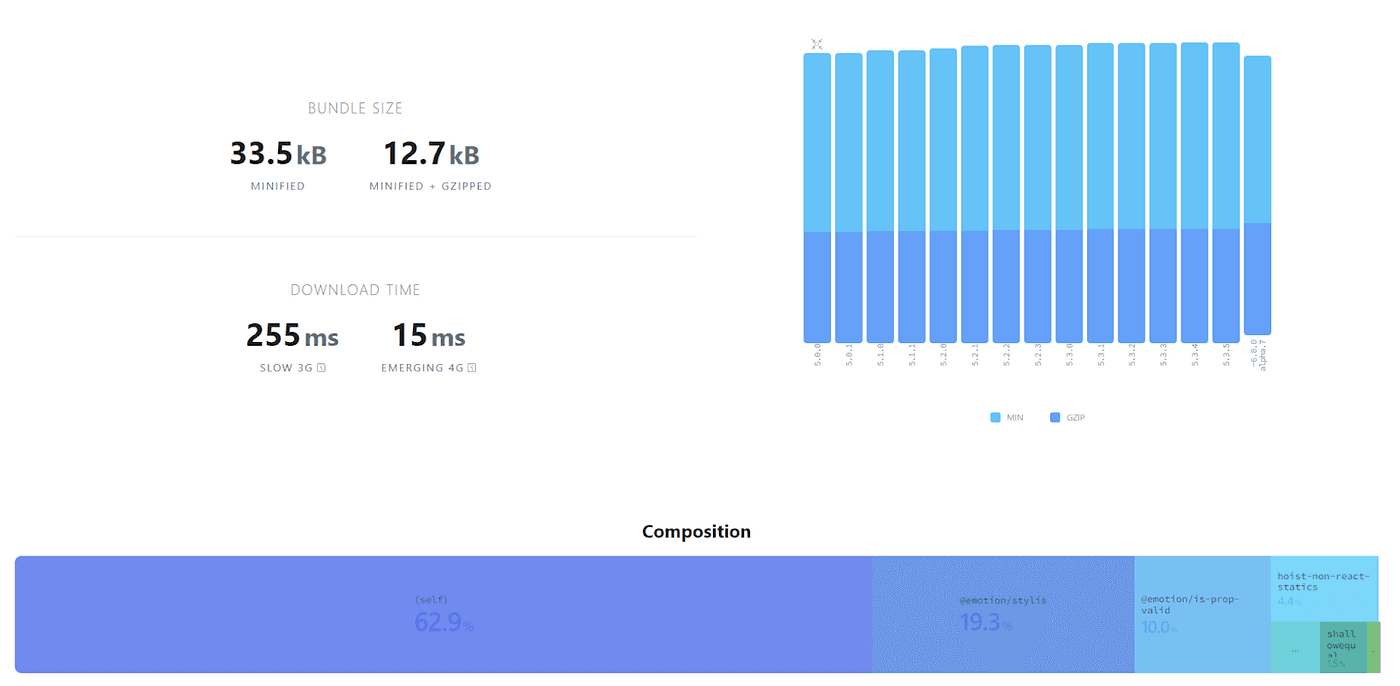
因為 styled-components 需要 runtime 處理 tagged template 並進行相關的 transform,所以 package 需要相關的 parser 及 processor,導致增加 bundle size 也是瓶頸之一。
Performance issue
styled-components 的 prop 用法也會不小心造成效能陷阱,如果像下方範例這樣實作,搭配 react-spring 等會快速改變 value 的情況下,因為需要執行 runtime 處理的 4 步驟,效能會相當的差。
const AnimatedDiv = styled.div`
  transform: translateY(${props => props.y});
`;
SSR Hydration
需要搭配 babel plugin,在 build time 為每個 styled-component 產生 unique 的 id,並在每個 request 處理 AppTree 產生 style tag。在 server 額外進行這個流程也會稍微提高 TTFB。
Streaming Rendering
目前 React 18 可使用 streaming rendering 來讓 app 的 render 更有彈性,但 styled-components 尚未支援 streaming rendering。雖然這並不單是 styled-components 的問題,所有的 runtime solution 都必須額外實作才能相容,但以想要在 React 18 使用完整功能來說也是一個限制。
native ESM
migrate 至 native ESM 也是我們今年的目標之一,但 styled-components 其實還不支援 native ESM,主要是因為它的 entry 沒辦法被正確的識別出 export default,導致我們要用 patch 的方式來解決。
Zero Runtime CSS-in-JS
為此我們需要一個更好的解決方案,因為對我們影響最嚴重的就是 runtime overhead,所以決定開始研究 Zero Runtime CSS-in-JS 的 solution。什麼是 Zero Runtime CSS-in-JS 呢?
"Zero-runtime" meaning you author your styles in a CSS-in-JS syntax, but what is produced is .css files like any other CSS preprocessor would produce. CSS-Tricks
只要我們在 JavaScript 裡使用 CSS-in-JS 的寫法,但最後是透過 compiler 產生出靜態的 css 檔案那麼就可以稱之為 Zero Runtime CSS-in-JS。
Why Zero Runtime?
選擇使用 zero runtime 的解決方案有幾個優點:
- Concurrent rendering 支援度:因為在 build time 處理成靜態的 css,所以不會有 SSR 處理 style tag/hydration 的問題
- Disabled JavaScript:當瀏覽器關閉 JavaScript 後依然保有樣式
- JavaScript 越少 = 越快:少了 runtime overhead 對於加強各項指標可以說是毋庸置疑的
在研究期間我們也有找到文章在評比 runtime vs zero-runtime 的數據,幾乎在各項指標都是 zero runtime 勝出:
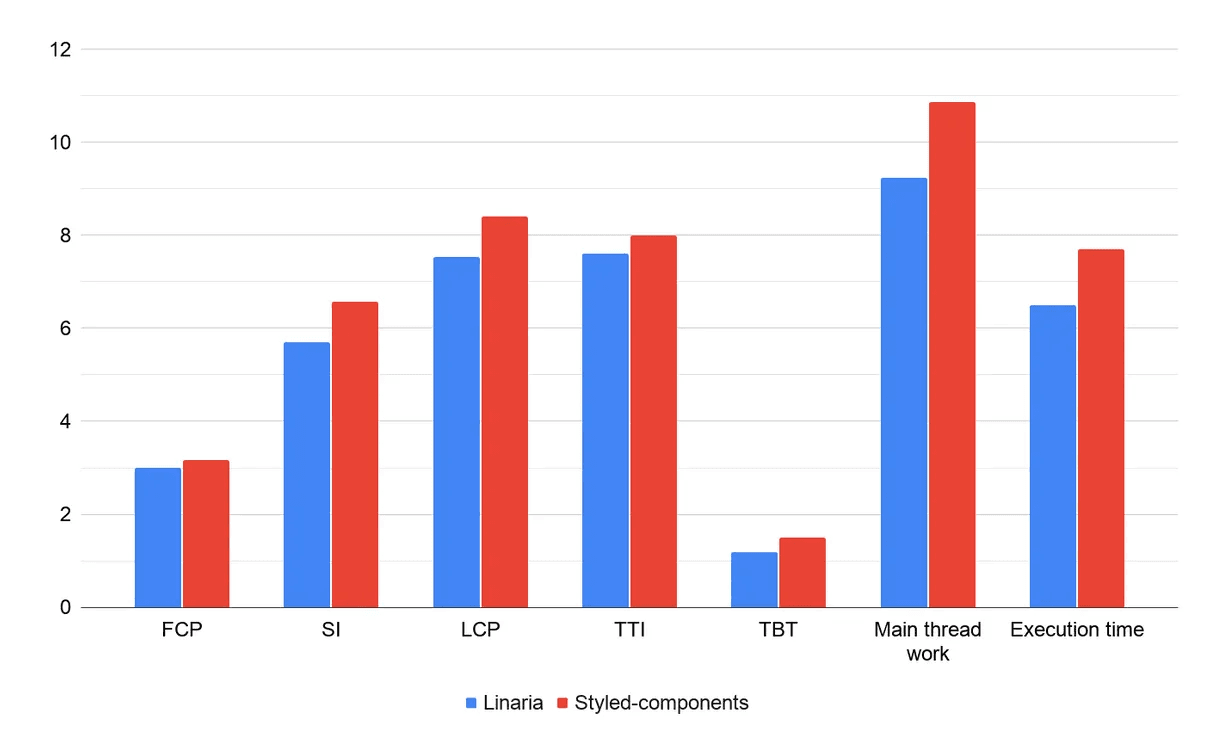
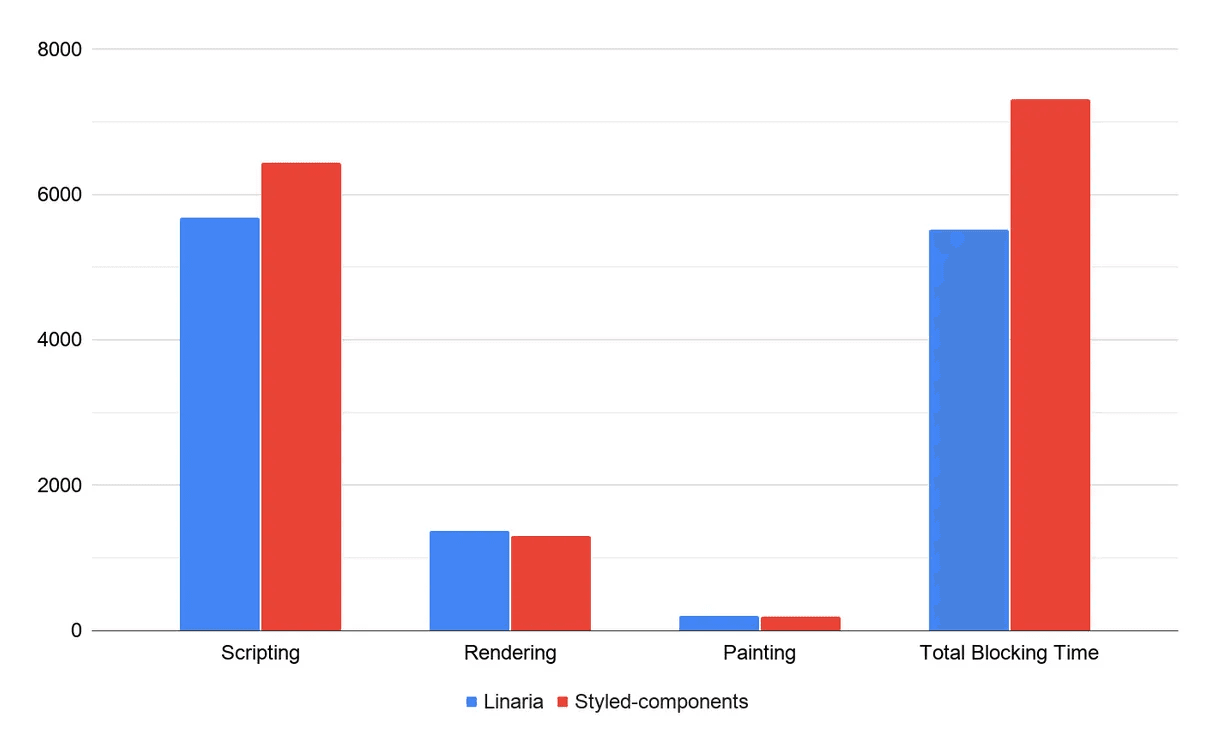
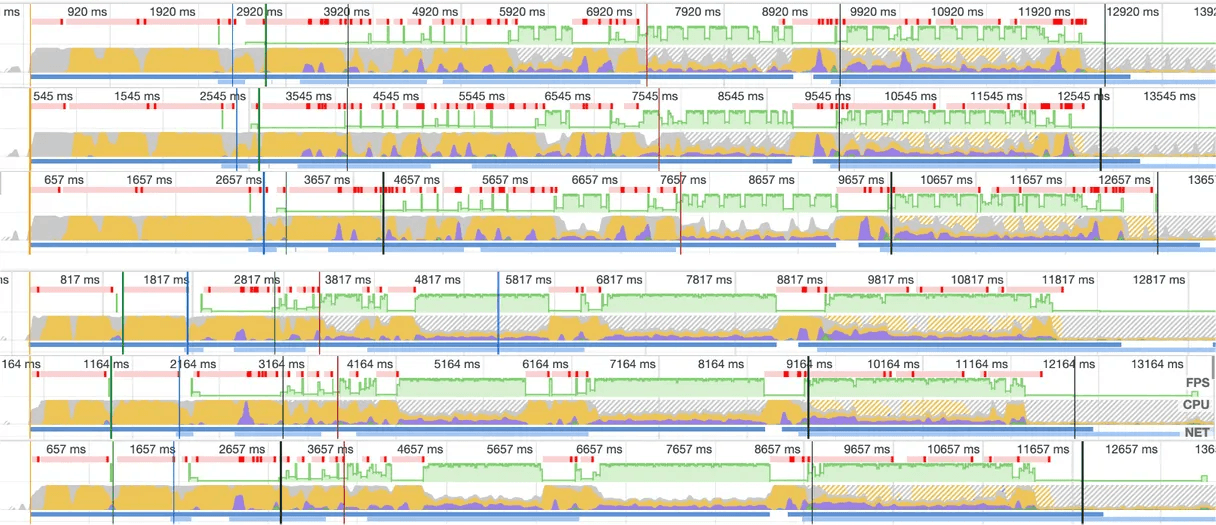
React 的核心開發者 Dan Abramov 也在一次的 Q&A 說到:
"for dynamic stuff just use inline styles. For things that don't change use something that compiles to CSS so that it doesn't have extra runtime costs."
- Dan Abramov
所以未來的 CSS-in-JS 採用 zero runtime 的形式可以說是勢在必行。
替代方案
在發現 styled-components 真的造成我們效能上的瓶頸後,我們開始分析需求,以便找到適合的工具來替換掉 styled-components:
- 提升 Core Web Vitals 為首要任務,重視 SEO
- codebase 裡將近有 6000 個 styled-components
- 可否平滑的 migrate,甚至共存
- 是否支援 atomic CSS
- TypeScript 支援度
- bundler/compiler support
- 社群健康度
最後我們找了幾個不同的解決方案,並整理成表格。
原本我們心目中的首選是 Facebook 目前正在使用的 stylex,但很可惜的原本預計去年 2021 年底就要有 beta 版本釋出,但一直到今年都遲遲未出現。所以我們也看了一些其它選擇。
最後我們選擇了 linaria,很大的原因是因為 linaria 的 syntax 跟 styled-components 幾乎一樣,除此之外還支援 Atomic CSS,且 Airbnb 也在近期 migrate 至 linaria,更讓我們有信心選擇使用 linaria。
linaria — Zero-runtime CSS in JS library.
styled
import { styled } from '@linaria/atomic';

const Title = styled.h1`
  font-size: 24px;
  font-weight: bold;
`;

function Heading() {
  return <Title>This is a title</Title>;
}
上面是 linaria 的範例程式碼,跟 styled-components 幾乎一樣,但不一樣的是會在 build time 做靜態分析,產生 .css 檔案:
// extract.css
.title {
  font-size: 24px;
  font-weight: bold;
}

// component.js
function Title(props) {
  return <h1 {...props} className="title" />;
}

function Heading() {
  return <Title>This is a title</Title>;
}
dynamic style
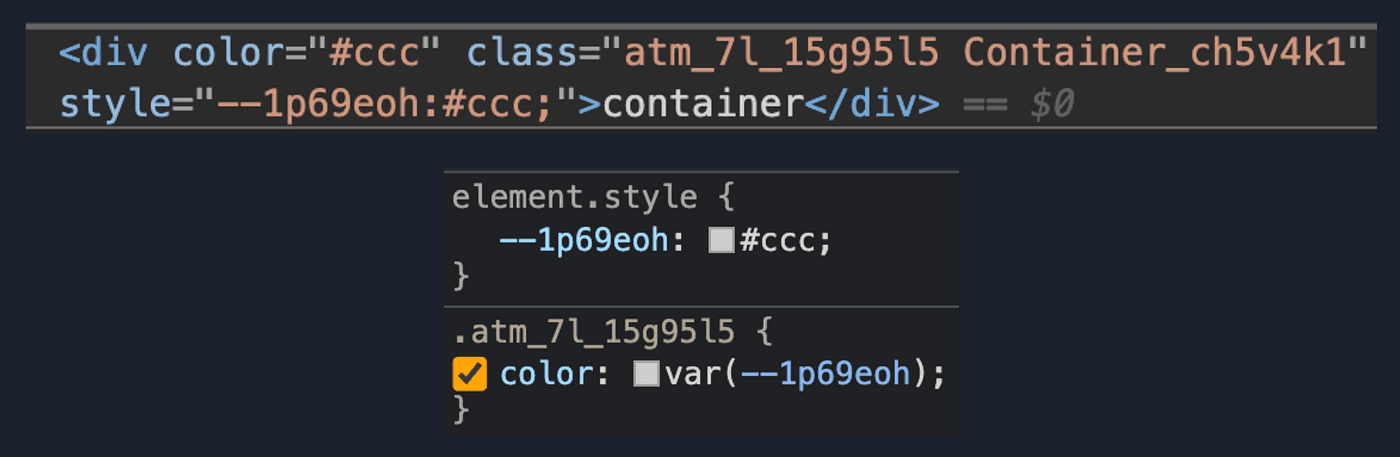
而 styled-components 的 props 在 linaria 也有支援,它是透過 css variable 來做到 dynamic style:
// source
const Container = styled.div`
  color: ${props => props.color};
`;

// extract.css
.Container_c1ugh8t9 {
  color: var(--c1ugh8t9-0);
}

// component.js
const Container = styled('div')({
  name: 'Container',
  className: 'Container_c1ugh8t9',
  vars: {
    'c1ugh8t9-0': [props => props.color],
  },
});
在 devtool 就會看到這樣的結果:
Interpolations
linaria 為了拿掉 runtime overhead,有支援 interpolation,會在 build time 時跑一個 JavaScript runtime,把沒有 side effect 的 value / function 預先 evaluate 並放回原本的位置:
// theme.ts
export const theme = {
  colors: {
    primary: '#000',
  },
};

// before evaluate
const Title = styled.h1`
  color: ${theme.colors.primary};
`;

// after evaluate
const Title = styled.h1`
  color: #000;
`;
除此之外也支援 Object Interpolations 來取代 styled-components 的 css helper。
Atomic CSS
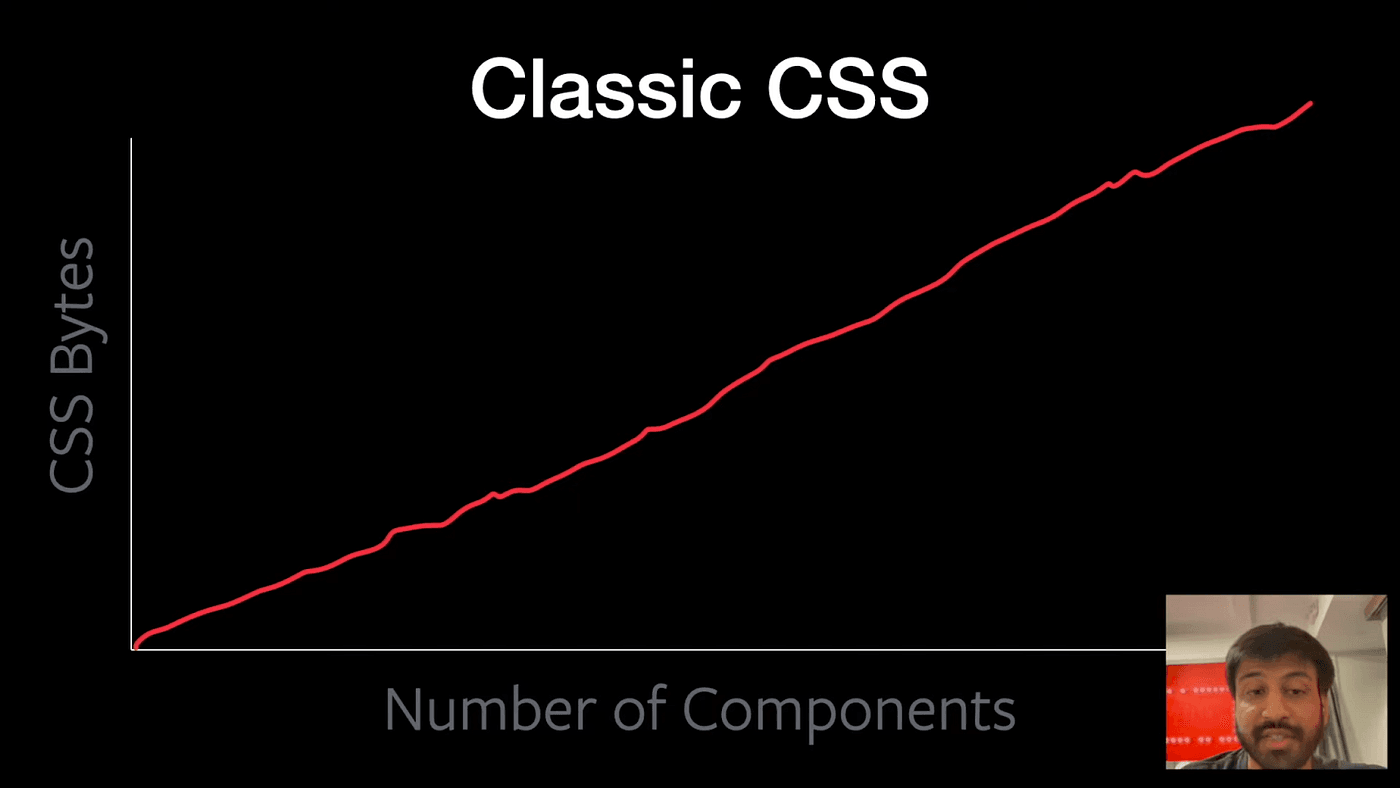
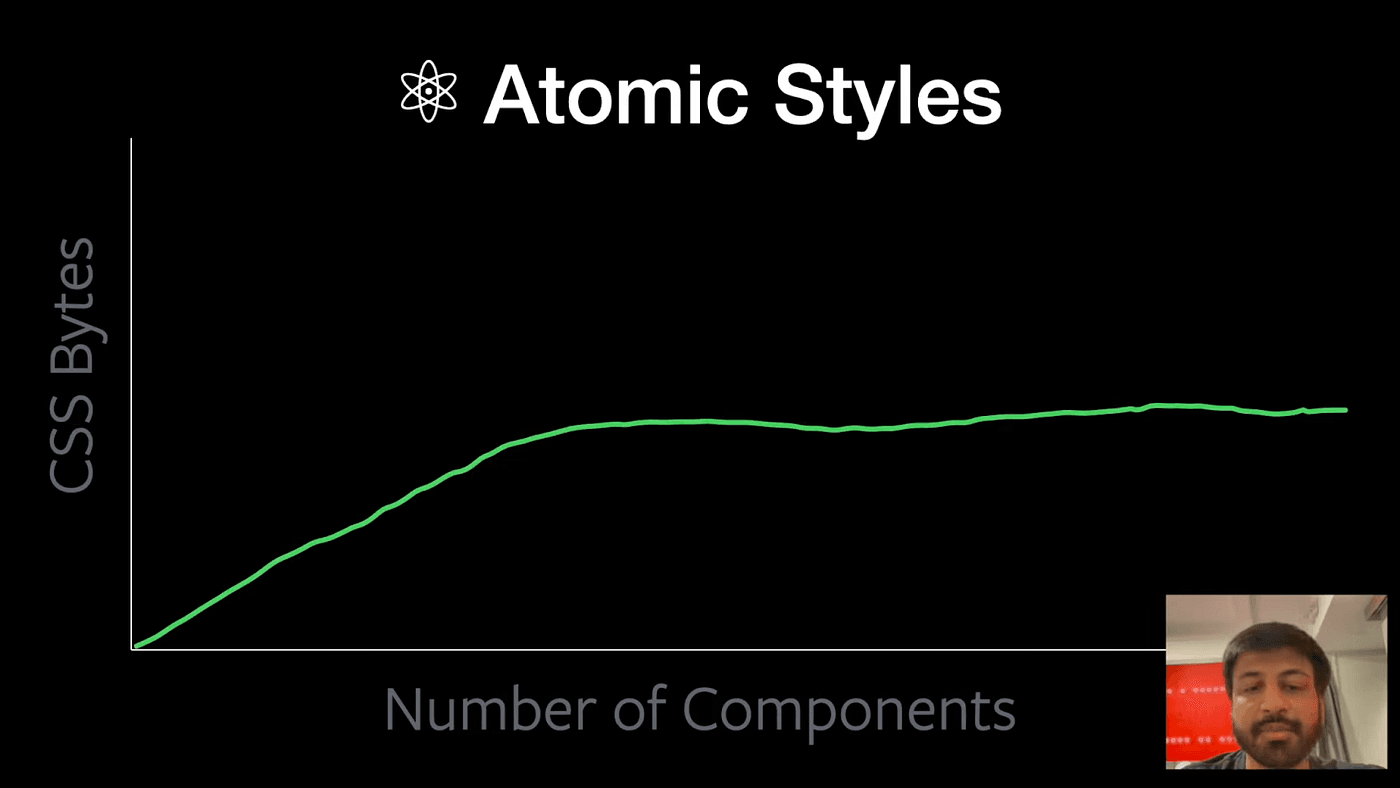
雖然將 CSS-in-JS syntax 透過 pre build 的方式產生 css 可以有效減少 runtime overhead,但缺點就是 css 檔案會隨著 component 的數量而增加。因此我們就會需要 atomic css 來輔助,達到重用 class name 的作用。
// source
import { cx } from '@linaria/core';
import { css } from '@linaria/atomic';

const atomicCss = css`
  background: red;
  width: 100%;
  height: 100%;
  border: 1px solid black;
`;

const blueBackground = css`
  background: blue;
  border: 1px solid black;
`;

<div className={cx(atomicCss, blueBackground)} />;

// extract.css
.atm_background_abcd { background: red; }
.atm_width_efgh { width: 100%; }
.atm_height_ijkl { height: 100%; }
.atm_background_qrst { background: blue; }
.atm_border_mnop { border: 1px solid black; }

// component.js
import { cx } from '@linaria/core';
import { css } from '@linaria/atomic';

const atomicCss =
  'atm_background_abcd atm_width_efgh atm_height_ijkl atm_border_mnop';

const blueBackground = 'atm_background_qrst atm_border_mnop';

// In React:
<div className={cx(atomicCss, blueBackground)} />
在範例中可以看到 atm_border_mnop 被重用了,因此隨著 component 數量的增加,能重用的 class name 就越多:
Migrate 至 linaria 的限制
- 動態 theming 需仰賴 css variables:在 styled-components 我們可以使用 ThemeProvider 來做到動態的 theming,而在 linaria 我們就必須使用 native css variable 來達成
- css function 中只能是靜態樣式:因為 css function 是產生靜態的 class name,因此不能跟 styled-components 一樣把 css 的結果放進 styled 裡
- 沒有 styled.x.attrs:linaria 本身沒有提供這個 API,因此需要重新宣告成 component
- interpolations 有限制:對於一些透過 bundler處理的 import file 在 evaluating 時會 error,所以要改成 callback 讓 builder skip evaluate。詳情可以參考這個章節
- build time solution 會降低開發速度:需要在 build time 跑一個 JS runtime 來 evaluate
Benchmark
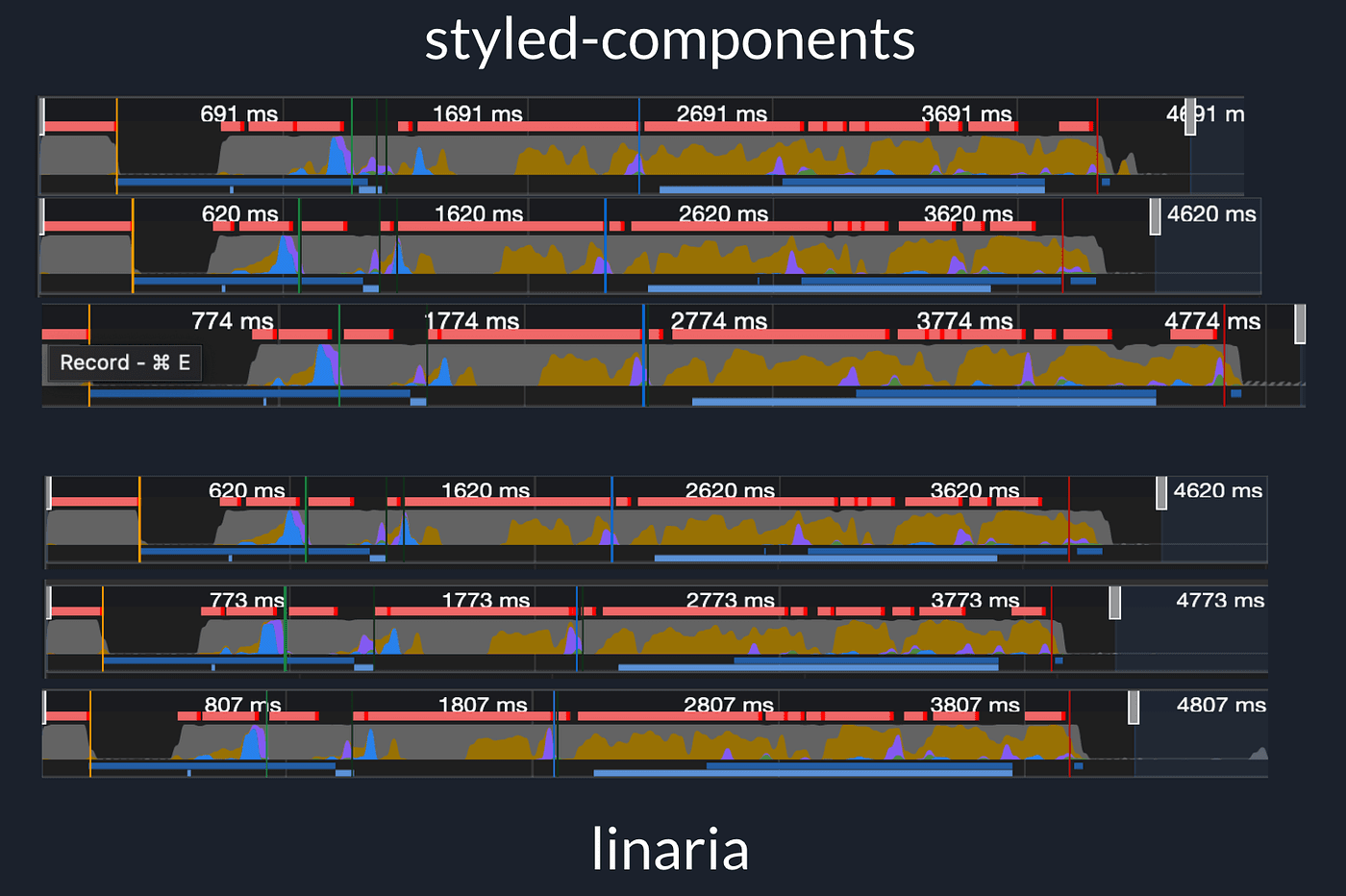
在我們一個比較小內部系統實測轉換成 linaria 的 benchmark,可以看到在各項數據都有不錯的成長:
Conclusion
- 如果重視 SEO 就避免使用有 runtime 的 CSS in JS,否則 core web vitals 的分數會受效能影響
- styled-components 的 user 可以考慮 migrate 至 linaria,語法相似但有更好的效能
- zero runtime 的 solution 建議一定要搭配 atomic css,減少 runtime overhead 的同時也不會增加太多 bundle size